If you are out of balance and can't recharge, and you want to make a call or access the internet. Here are the best solutions to get emergency loans for your call or internet access by dialing USSD code *0#.

What is Telenor Advance Balance?
A Telenor advance balance is a service that gives users advance balances in case of emergencies without recharging their SIM cards. When the user recharges their sim, the advance loan is automatically deducted from their account. Telenor advance loan offer that provides 30 rupees so that users can make phone calls or use internet without being interrupted.
When Is Telenor Advance Most Helpful?
Telenor advance is most helpful for those who are some such conditions:
- They can not recharge their sim at that time.
- They need urgent balance.
- They dont have money to recharge at that time.
Who Can Use the Telenor Loan Service?
All Telenor customers who meet the following conditions can take out a loan:
- The Telenor sim should be at least 30 days old.
- Once a month, the user should recharge.
- A double loan is not allowed, so the user must have paid the previous loan if he had taken it. So he can take it again.
How to Get Instant Credit with the Telenor Loan Code
You can simply can take loan by dialing ussd code.
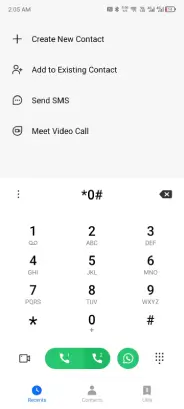
- Open your mobile dial pad.
- Dial loan code *0#
- Once you dial, you will receive an SMS confirming that the amount was successfully received.
How to Get Instant Credit through My Telenor app
You can also get loan through My Telenor app.
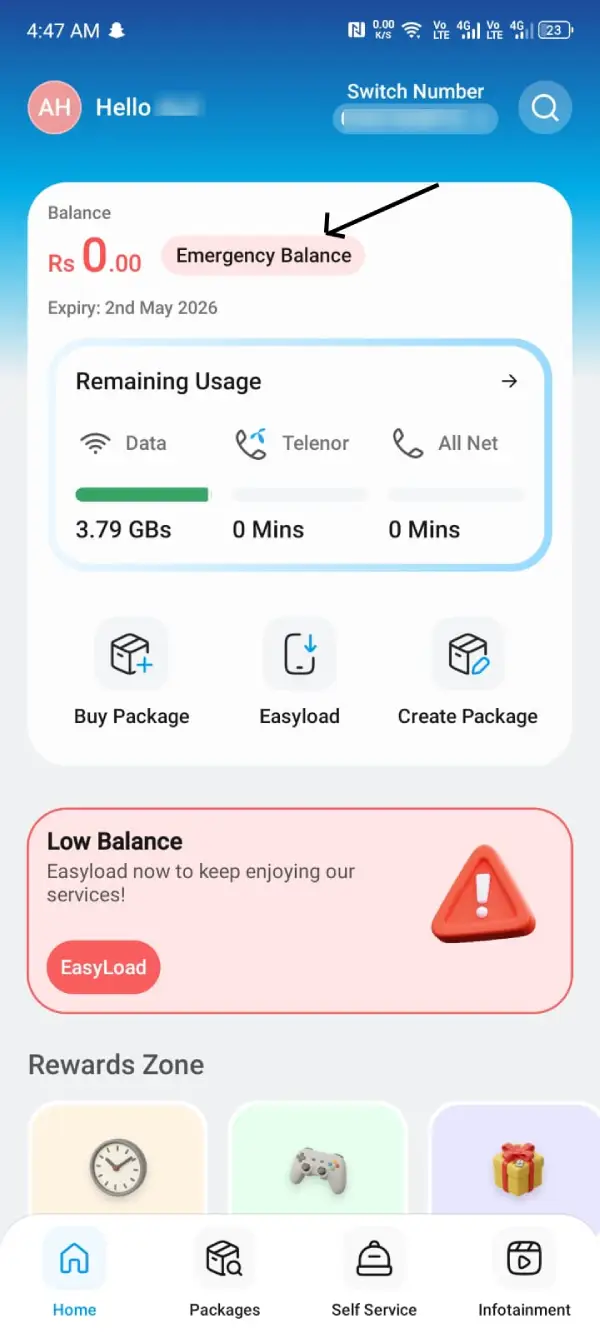
- You have to open your telenor app.
- Look for the emergency loan usually appears near the balance display.
- Your account will be credited with the balance once you tap it.
How to Check Telenor Advance Balance
You can check your balance through two ways. You can check your balance by dailing a ussd code *444#. If you have insufficient balance you can not check your balance through ussd code. You can also check your remaining MBs by dialing *999#. There is one alternative for that you can check your balance through my telenor app. Open your app balance will show on the home screen.
Important codes:
For loan: *0#
For balance check: *444#
Charges of Telenor Advance
The service charges for this loan is Rs 11. When you recharge your sim, advance charges are automatically deducted. The amount of the loan is first deducted from your account, and then the balance is added.
How to Unsubscribe from Telenor Advance Balance
Telenor advance balance service is a one-time subscription that is only active after you dial the code, and then it is finished until you resubscribe. In any case, if it's automatically activated, you should contact Telenor through live chat or through the help line number 345.
Tips to Use Telenor Loan Judiciously
- Use Telenor loan balances only in an emergency situation since you have to pay service charges for them.
- Be sure to remember the Telenor advance loan code in case of an emergency.
- You should always return it immediately whenever you have a chance, so that you can use it in an emergency again.
- Consider activating Telenor balance save code to protect your balance from unwanted deductions after recharging.
FAQs – Telenor Loan Code 2026
The code is *0#.
Yes, that is exactly what the service is for! As long as you are eligible, you can get it with Rs. 0 balance.
You might already have an unpaid loan, or your SIM might be too new (less than 30 days old).
Dial *444# to check your balance. If you see a negative balance or less balance than you expected after a recharge, it means a loan was deducted.